DNS Lookup
Type a domain to see all its DNS records from a public resolver, with TTLs and quick checks.
Recent
Your last 10 settings, saved only in this browser. Nothing is uploaded.
Get notified about new checks and updates
We send a short email only when we add a new tool or make a major change to one — no newsletter, no ads, never shared. To unsubscribe, email support@360jiance.com with the word “unsubscribe” and we delete your address. What we store.
Popular tools
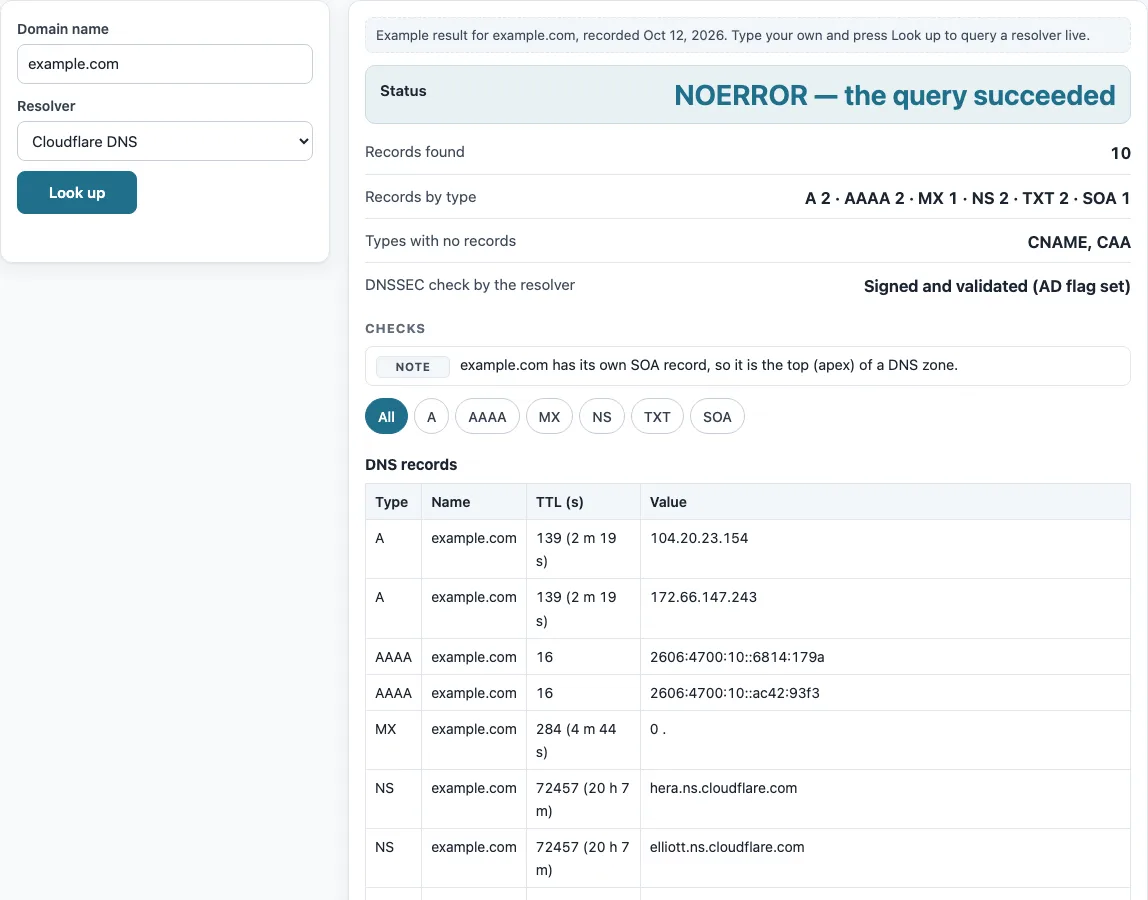
How to use the DNS lookup tool
- Type a domain into the “Domain name” box, for example example.com. A full URL also works, because the scheme, path and port are removed. An IP address is refused, so use the reverse DNS lookup tool for those.
- Choose a resolver: “Cloudflare DNS” or “Google Public DNS”.
- Press “Look up”. No query is sent before this.
- Read “Status” and “Records found”. A status of NOERROR means the query succeeded.
- Check “Records by type”, “Types with no records” and “DNSSEC check by the resolver”.
- Scroll to the table under “DNS records”. Use the filter buttons (“All”, “A”, “AAAA” and so on) to show one record type.
After a result, “Copy result” copies the output. “Copy link” creates a link that repeats the same lookup when opened. The section “The same query on the command line” shows equivalent commands for a terminal.
Below the result, “The same query on the command line” lists the matching dig and nslookup commands, so you can repeat the check from a server or compare it with your own network’s resolver. To compare resolvers, run the lookup once with “Cloudflare DNS” and once with “Google Public DNS”: different answers usually mean one of them still holds an older cached copy.
How to check DNS records
The tool asks the resolver a separate question for each of the eight record types, then combines the answers. DNS has no single query that lists everything. The resolver replies with a status code and a list of records. The “Records by type” output counts them, and the table lists each one with its Type, Name, TTL (s) and Value. For example.com, the example result shows 10 records: A 2, AAAA 2, MX 1, NS 2, TXT 2 and SOA 1, with no CNAME or CAA. Querying type ANY is discouraged (RFC 8482), so the tool does not use it.
How to check DNS A record
An A record holds an IPv4 address for a name, and an AAAA record holds an IPv6 address. The table sorts A and AAAA rows by address, which makes them easier to compare. Press the “A” filter button to show only A records. Each value in the Value column is the address the resolver returned at that moment.
How to check DNS TTL
TTL is the time, in seconds, that a resolver may keep a record in its cache. The TTL column shows the time left, with a human unit such as “300 (5 m)”. The number counts down between lookups, because it is what remains in the resolver’s cache. Lowering the TTL before you change a record shortens the wait for the new value. The TTL definition is in RFC 1035 §3.2.1.
What is the apex of a DNS zone?
A zone is a part of the DNS namespace that one set of name servers manages. The top of a zone is called the apex. When a name has its own SOA record, the “Checks” list says it is the apex of a zone. An SOA record holds the primary name server, the responsible mailbox, serial, refresh, retry, expire and minimum values. A name with a CNAME record cannot sit on the apex, because the apex always has SOA and NS records.
How to check DNS entries
Each row in the table is one entry. A status of NXDOMAIN (RCODE 3) means the name does not exist. SERVFAIL (RCODE 2) means the resolver could not get a valid answer, and REFUSED (RCODE 5) means it declined the query. NOERROR with an empty answer is called NODATA. It means the name exists but has no record of the type you asked for (RFC 2308 §2.2).
A resolver follows a CNAME for any query type. The NS, TXT and CAA answers for an alias therefore come from the alias target (RFC 1034 §3.6.2 and §4.3.2), and the page notes this when a name has a CNAME.
What do DNS record values mean?
MX records have a preference number, and lower numbers are tried first. An MX value of “0 .” is a null MX, which says the domain accepts no mail. A TXT record holds one or more strings of at most 255 bytes each, and several strings in one record are joined. CAA records tell certificate authorities which of them may issue certificates for the name. If “DNSSEC check by the resolver” shows the AD flag, the validating resolver passed the answer through DNSSEC validation. Without the flag, the zone is unsigned or the answer was not validated.
Can a DNS lookup show older records?
The tool shows only what the resolver returns at the moment of the lookup, so it cannot show earlier values. It also cannot see records the resolver does not return. Results can differ from what other networks see while caches expire. Only the eight types in the table are queried. For other types, see the DNS record types page.
Sources (checked 13 October 2026): RFC 1034 · RFC 1035 · RFC 2308 · RFC 8482 · Cloudflare DNS docs · Google Public DNS docs
Worked examples
| Input | Result |
|---|---|
| example.com, all common record types | NOERROR — the query succeeded; A 2 · AAAA 2 · MX 1 · NS 2 · TXT 2 · SOA 1 |
| github.com, all common record types | NOERROR — the query succeeded; A 1 · MX 1 · NS 8 · TXT 24 · SOA 1 · CAA 7 |
| www.github.com, all common record types | NOERROR — the query succeeded; A 1 · CNAME 1 · MX 1 · NS 8 · TXT 24 · SOA 1 · CAA 7 |
Calculated by the tool above; open it with the same values to see each step.
Frequently asked questions
How do I lookup DNS records for a domain?
Type the domain into “Domain name”, choose a resolver and press “Look up”. In a terminal, you can also run dig <domain> <type> or nslookup -type=<type> <domain>.
How do I check all DNS records for a domain?
DNS has no single query that returns every record. The tool asks for A, AAAA, CNAME, MX, NS, TXT, SOA and CAA separately and combines the answers. Other record types are not included.
How long does it take for DNS records to update?
An old record can stay in resolver caches for up to its TTL. The TTL column shows the time left in each resolver’s cache, so check it to estimate the wait.
How do I check DNS changes?
Look up the domain again on both “Cloudflare DNS” and “Google Public DNS”, then compare the values. A resolver that still shows the old value has it cached until the TTL runs out.
How do I check DNS CNAME records?
If the name has a CNAME, a “CNAME” filter button appears above the table and shows only that row. The CNAME lookup page follows the whole alias chain to the final address.
How do I check DNS entries from a terminal?
Run dig +noall +answer example.com A or nslookup -type=A example.com in a terminal. Both commands are listed under “The same query on the command line”.
Why does my DNS lookup show NXDOMAIN?
NXDOMAIN (RCODE 3) means the name does not exist for that resolver at the time of the query. Check the spelling of the domain first, then look it up again.
Related tools
- A record lookup: use it when you only need the IPv4 and IPv6 addresses behind a name.
- MX lookup: use it to see which mail servers a domain lists and their preference numbers.
- TXT record lookup: use it to read SPF, verification and other text records.
- CNAME lookup: use it to follow an alias all the way to its target.
- NS lookup: use it to check which name servers a domain uses.
- Reverse DNS lookup: use it to find the name linked to an IP address.
- DNS propagation checker: use it to compare answers across several locations after a change.
- DNS record types: use it to learn what each record type is for, including types this tool does not query.